
Tuesday, March 12, 2013
I haven't forgotten about you, I swear!
Hey guys! Sorry it's been so long since I've posted. I've been super busy with all sort of stuff. Fear not, April will bring many posts to this blog since I am participating in the Blogging from A to Z Challenge this April. That's part of the reason I've been absent. I'm trying to figure out what I'll be posting during this time, so please hang in there and I promise you'll see something marketing related at least once a week until we get to April! I'm going to try to post something tomorrow or the next day. That all depends on how long it take to get our taxes done today. So wish me luck and I'll talk to you again later this week!

Wednesday, March 6, 2013
Associating your book with best sellers the RIGHT way.
We are all tempted to say things like, "My book is just as good/better than (Name your best-seller here)" We all get inspired by top books and movies and sometimes our work ends up being something that fans of that book or movie would love and we want to tell them that. Unfortunately, telling people that your book is as good as Twilight (or whatever) is not the right way to go about it.
Wrong: Posting an image of your book photo shopped with images associated with other popular books and movies.
Right: Posting images of your book. Then later, posting images supporting those books and movies that are similar to yours. This tells people that you are a fan too and that your book might be up their ally.
Wrong: Saying that your book is as good/better than (insert popular title here)
Right: Letting reviewers say these things. (Don't tell them to say these things. Let it happen naturally.)
Wrong: Posting an image of your book side-by side with the other, more popular book.
Right: Trying to get on lists on which that popular book is on. Lists on Goodreads and Listmania would be perfect. This also improves your chances of being discovered.
So there you have it. Not only does doing things the "wrong way" make you look unprofessional, it can also be illegal. Using copyrighted images, for example, is illegal. Piggy-backing on someone else's fame or popularity isn't illegal, but should be.
Tomorrow we will talk about one of my biggest pet peeves in the marketing world.
Tuesday, March 5, 2013
Competition is tough--Take it from me.
Along with the indie revolution, comes extremely low prices on books. Most are around $3-$5 dollars for dgital copies. SOme are een as low as $.99. This is where I'm struggling. Yes. I'm admitting that I am struggling with the competition. My book is published through a small publisher, and I really love my publisher. They have done so much for me. My book is also $7 for a digital copy. That's al least $2 more than my competition and most often $4 more than my competition. That's more than double their price.
So what's a girl to do? I know WHAT I have to do. I just don't really know HOW to do it.
What I have to do:
I have to convince people that my book is worth the $7 price tag.
How can I do that?
How do I tell people that my book is worth the price without telling people that my book is "better" than others or that it's "higher-quality" than others? I can't do that because there are so many good indie books out there that are just as good and sometimes better than mine. Granted some are worse, but it's not like I'm going to point them out.
How do I say that my vampire series is the best without actually saying it? How do I convince people to spend those extra dollars on my story instead of buying that other one for $3?
Right now I'm trying out the old post-a-quote-from-a-review trick. I'll let you know how that goes. I'm also testing out facebook ads by running a week long campaign, so I'll let you know how that one goes too with stats and a short report.
This is the hard part about marketing. It's something I'm really struggling with and all I can do is hope that something I'm trying eventually works. Take it from me, if you want to sell books, you either need a great contract from a big publishing company, or you'll have to compete with the low indie prices.
Tomorrow we'll discuss the right ways and wrong ways to associate your book with best sellers. Why telling people out-right that your book is as good as the Twilight series is bad and posting stuff about Twilight on facebook is good!
Monday, March 4, 2013
8 Tips on creating ATTENTION GRABBING headlines!!
I've recently picked up a few books on generating interesting headlines, my favorite is 555 Hot Marketing Headlines. ($.99 on Amazon)
The book mentioned above gives you examples of headlines and has a hos of other resources at the end.
Anyways, here's what I learned from this book and other books:
Use numbers! People like lists so if you are blogging a list. Be sure to say how big your list is. If it's a huge list you can say that too. (5 Ways to Sell More Books! 20 Tips on Improving Your Social Media Profiles! Big List of Books!)
Use words like FREE, Giveaway! and Sale! People love deals. If there is a giveaway in your post, mention it in the headline!
Ask questions! People like putting in their two cents. A question will get them thinking and reading!
Use words like Guide, How-To and Advice. People like to learn stuff. Telling them that you are sharing your knowledge will mean that they may be able to learn something and they may be able to teach you something too!
Use words like New, Never-Before-Seen, Announcing and Exclusive! People like to be the first to hear about new trends, products and services. Using these words, tells them that they will have the first opportunity to tell their friends, family and co-workers about something new.
Controversial headlines draw them in too. People love controversy, but use this one with care.
Capitalize. People see capital letters easier. Just don't go overboard. One or two capital words are just fine. More than that might be excessive.
Combining a few of these will be even better!
Checking out Tribber and page views form my blog, I can see that my most popular recent headlines from Paranormal Lounge have been:
Big list of Paranormal Books! (List)
If you were a character in a novel, what role would you play? (Question)
BE MINE Giveaway for Obsidian: Mystic Stones Series #1 (Giveaway word use)
50 Shades Stance (I think this falls more under the controversial category than the number category)
Announcing a new short story series from . . . ME! (Announcing)
How do you draw people in with blog headlines? Come back tomorrow for a post on why I'm struggling to sell books and how you can learn from my struggle.
Friday, March 1, 2013
Uh, yeah. I forgot to write the headline post . . .
So, I'll write it over the weekend and post it on Monday. Sorry! I've just been really busy this week and I knew I was forgetting something. Well, I just figured it out! Headline tips coming on MONDAY! I promise!
Wednesday, February 27, 2013
The best times for you to post to facebook and twitter.
As marketers, we need to know the best ways to reach the most people. I'm a big fan of taking stats and analizing them, so that is the subject we're on today. I've already talked about twitter, facebook, triberr and other subjects. Today we are going to talk about the best times to post to twitter and facebook. This means the best times of the day and the best days of the week.
In doing my research I've found conflicting statistics and reports on the best time and day to post on twitter. In my experience, the best days are Monday through Thursday. Here's an article that backs me up on this from Ragan's PR Daily. The article shows that the most "click-throughs" happen Monday through Thursday around noon. Less specifically between 9a.m. and 3p.m.
Why are these times so popular?
My guess is that people start taking their mid-morning breaks and their lunch breaks during this time of day. Logically, people are still hanging on to their weekends on Mondays and also catching up on things they may have missed over the weekend. The early time of day id most likely due to procrastination. Things seem to get put off til later in the day and that's why the later hours are filled with actual work and checking off items on the to-do list.
Another reason?
Stay-at-home moms and dads don't have too much to do while their kids are in school, so they enjoy a little "me time."
Why are weekends dead on twitter?
Well, I'm not entirely sure myself, but I theorize that people are bust enjoying life. They go to events, birthday parties and go shopping in REAL stores. That's a good thing! It gives you time to come up with content to post during the week and time to enjoy life yourself!
One feature I love about Hootsuite is their new auto-schedule button. This tweets your message at the opportune time. It automatically calculates the next time a spike in twitter visitors will occur by using data from the past.
On to facebook posting. Facebook is apparently another story. Some unexpected reports show that facebook has differences and similarities to twitter. Here's an article that may help you with facebook. There are a few twitter stats too, so be sure to take note of them in this article from FaceItPages.
The infographic shows us that facebook thrives on weekends--particularly Saturday. It also shows that shares spike around noon and seven. It also claims that one post every other day will garner the most page likes. I'm not sure about this particular stat, but I guess it wouldn't hurt to give it a try.
Basically, the facebook crowd grows during lunch on weekdays and in the afternoon on Saturdays. Keep these times in mind when you are posting, and you'll do great!!
So there you have it. The best times to post and tweet. Come back on Friday for headline tips for blog posts.
Tuesday, February 26, 2013
Scrivener: The best $40 I ever spent on writing!
Okay, I was introduced to Scrivener by a friend of mine. What is Scrivener you ask? It's a word processor specifically for writers. Using this extremely inexpensive program, you can write, edit, format and publish anything from a full novel to a short story. There are also templates for scriptwriting, comic book writing and non-fiction writing.
Scrivener has a lot of features that will really help you get organized. The best part is, you can try it for 30 days and once that 30 days is up and you decide you like it, it's only $40. There are versions for Mac and Windows, and the Windows version just got a free update with more features that were only available for Mac before.
Let's start with how it helps you organize while writing:
Scrivener lets you create a separate text document for each chapter or section--you can set this up however you'd like. Then once you are finished, you can compile the all the documents, or just selected documents into a host of formats including kindle, .epub, .doc and SOOOO many more.
There are also some fun features.
Want to set a manuscript and or session word goal? Just go to Project>Project Targets and you can set the manuscript goal and your goal for the session.
You can also see an estimate of how many pages your book would be printed out or in paperback by going to Project>Project Statistics.
Stuck on what to name your characters? Forget searching for your baby name books or scouring the Internet, there is a name generator. Go to Tools>Writing Tools>Name Generator. You can even customize what origin the first and/or last name comes from, the gender, and choose whether you want first name only, last name only or both. I believe you can even add up to three last names. You can also find the meaning of first names and search names by the meaning you are going for.
Next, let's talk about how Scrivener helps you organize while editing:
If you have separated your chapters, after writing your first draft, you are able to go through and label each chapter in two ways. The first way is a color label. You can choose to have No Label (grey), Idea (yellow), Notes (orange), Needs Work (red), Good to Go (green), and Scene (blue). You are able to edit these colors to mean what ever you want, but these are the defaults. The next way you can label is by assigning each folder or text a status. The statuses are none, to do, first draft, revised draft, final draft and title page. You can add, remove or customize these too. Here is a screen shot to show you what I'm talking about. To get to the screen I'm about to show you, you would click on "Manuscript" in the left-side binder panel in Scrivener.

As you can see, I am able to tell exactly where I am in the editing process. Before Scrivener I had to write down what chapter I was on since when ever I closed out of my word document, it would not save my place. With Scrivener, not only does it automatically open to the project you last worked on, it opens to the very place you left your cursor.
Okay, on to the subject of formatting and publishing with Scrivener:
So far, I have only published short stories to Amazon with Scrivener. But I have found it to be very easy to format to .mobi by using the compile button. Compile on Scrivener, takes all those sections, and combines them into one document. You can pick and choose which ones to include as well as which titles and subtitles to include. I suggest going through the tutorial and learning more about this. I decided to wing it and got dinged a couple times. Once you figure out how you want to format your work, you start to remember the settings you used. It's probably not a bad idea to write them down. I think you might even be able to save the settings too, although I have not yet figured out how to do that. Soon I will be formatting for .epub, so I will keep you posted.
I have been extremely happy with Scrivener and I suggest that every writer at least try it out. The 30 day trial is risk free and fully featured. The fact that you can do everything from writing to publishing in one program is amazing. If you are publishing to kindle (who isn't these days?) I would suggest getting the kindle for desktop app downloaded so that you can check out your .mobi files before you upload them to Amazon. It's really easy to check them out, find an error, fix it, compile the new file, replace the old file with the new, check it out again on the kindle app and finally publish when you have found no more errors.
For more info or to give it a try, head to this link: http://literatureandlatte.com/scrivener.php
See you tomorrow when we talk about the best times to post to facebook and twitter!
Scrivener has a lot of features that will really help you get organized. The best part is, you can try it for 30 days and once that 30 days is up and you decide you like it, it's only $40. There are versions for Mac and Windows, and the Windows version just got a free update with more features that were only available for Mac before.
Let's start with how it helps you organize while writing:
Scrivener lets you create a separate text document for each chapter or section--you can set this up however you'd like. Then once you are finished, you can compile the all the documents, or just selected documents into a host of formats including kindle, .epub, .doc and SOOOO many more.
There are also some fun features.
Want to set a manuscript and or session word goal? Just go to Project>Project Targets and you can set the manuscript goal and your goal for the session.
You can also see an estimate of how many pages your book would be printed out or in paperback by going to Project>Project Statistics.
Stuck on what to name your characters? Forget searching for your baby name books or scouring the Internet, there is a name generator. Go to Tools>Writing Tools>Name Generator. You can even customize what origin the first and/or last name comes from, the gender, and choose whether you want first name only, last name only or both. I believe you can even add up to three last names. You can also find the meaning of first names and search names by the meaning you are going for.
Next, let's talk about how Scrivener helps you organize while editing:
If you have separated your chapters, after writing your first draft, you are able to go through and label each chapter in two ways. The first way is a color label. You can choose to have No Label (grey), Idea (yellow), Notes (orange), Needs Work (red), Good to Go (green), and Scene (blue). You are able to edit these colors to mean what ever you want, but these are the defaults. The next way you can label is by assigning each folder or text a status. The statuses are none, to do, first draft, revised draft, final draft and title page. You can add, remove or customize these too. Here is a screen shot to show you what I'm talking about. To get to the screen I'm about to show you, you would click on "Manuscript" in the left-side binder panel in Scrivener.
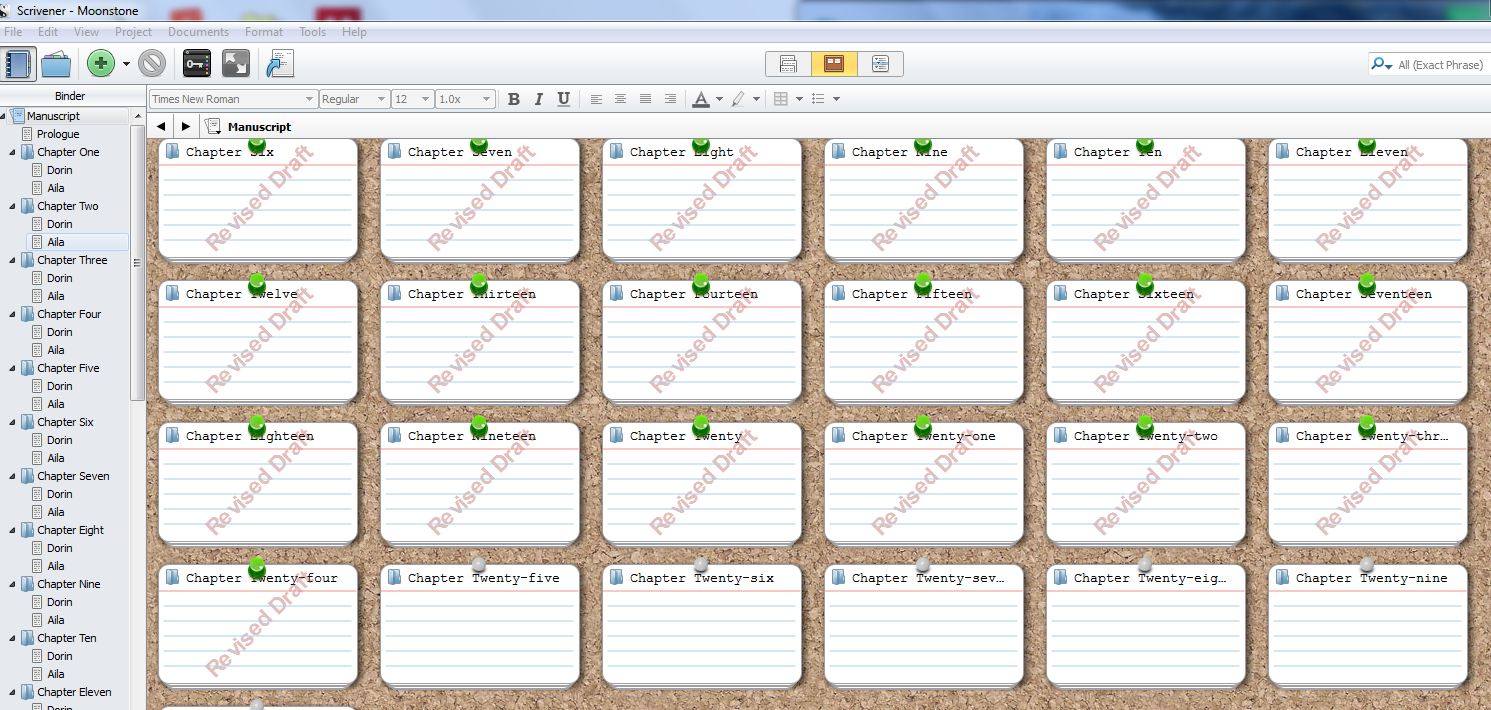
As you can see, I am able to tell exactly where I am in the editing process. Before Scrivener I had to write down what chapter I was on since when ever I closed out of my word document, it would not save my place. With Scrivener, not only does it automatically open to the project you last worked on, it opens to the very place you left your cursor.
Okay, on to the subject of formatting and publishing with Scrivener:
So far, I have only published short stories to Amazon with Scrivener. But I have found it to be very easy to format to .mobi by using the compile button. Compile on Scrivener, takes all those sections, and combines them into one document. You can pick and choose which ones to include as well as which titles and subtitles to include. I suggest going through the tutorial and learning more about this. I decided to wing it and got dinged a couple times. Once you figure out how you want to format your work, you start to remember the settings you used. It's probably not a bad idea to write them down. I think you might even be able to save the settings too, although I have not yet figured out how to do that. Soon I will be formatting for .epub, so I will keep you posted.
I have been extremely happy with Scrivener and I suggest that every writer at least try it out. The 30 day trial is risk free and fully featured. The fact that you can do everything from writing to publishing in one program is amazing. If you are publishing to kindle (who isn't these days?) I would suggest getting the kindle for desktop app downloaded so that you can check out your .mobi files before you upload them to Amazon. It's really easy to check them out, find an error, fix it, compile the new file, replace the old file with the new, check it out again on the kindle app and finally publish when you have found no more errors.
For more info or to give it a try, head to this link: http://literatureandlatte.com/scrivener.php
See you tomorrow when we talk about the best times to post to facebook and twitter!
Subscribe to:
Posts (Atom)